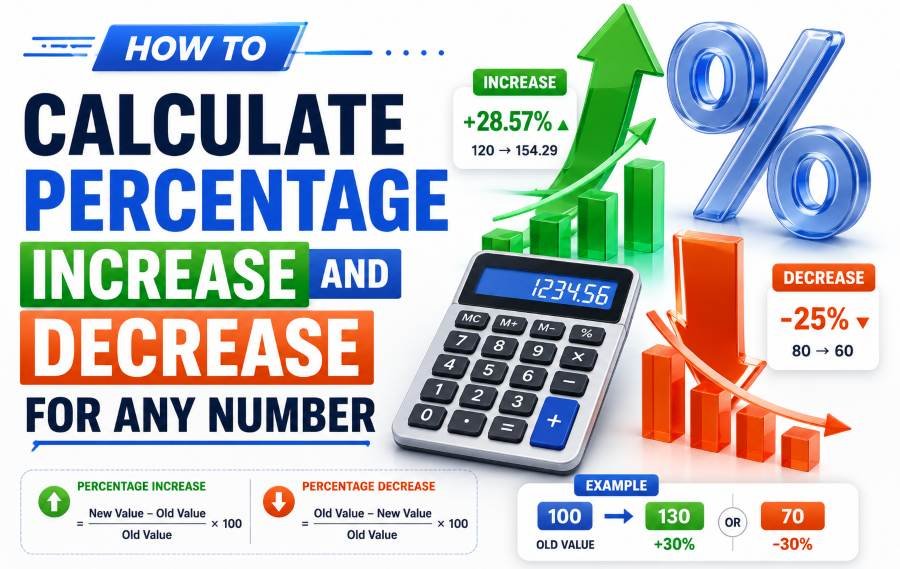
Percentage change is the most used math in business, finance, and everyday life. Revenue growth. Discount calculations. Salary raises. Price drops. All of them rely on one formula.
And most people get it wrong.
The error is not in the multiplication or the division. It is in the denominator. People divide by the new number instead of the original. That single mistake changes every result. A 30 percent increase becomes 23 percent. A 25 percent discount becomes 20 percent. The numbers look close. But in business those gaps cost thousands of dollars.
I have used percentage change calculations across financial reporting, pricing strategy, and performance analysis for the last 6 years. This guide gives you the one formula that works for every scenario, walks you through 5 real examples, and shows you the mistakes that wreck most people's math.
Why Most People Calculate Percentage Change Wrong
The direct answer is they divide by the wrong number. The formula requires you to divide by the original value. Most people divide by the new value. This produces a result that is always smaller than the real answer.
Here is what goes wrong in practice.
Your revenue went from 80,000 dollars to 100,000 dollars. The increase is 20,000 dollars. Most people do this.
20,000 divided by 100,000 equals 0.20. They say revenue increased by 20 percent.
The correct math is this.
20,000 divided by 80,000 equals 0.25. Revenue increased by 25 percent.
That 5 percent difference is not rounding. It is a fundamental error. And it happens every time someone calculates percentage change without thinking about which number is the original.
The rule is simple and it never changes.
Always divide by the original number. The starting point. The value before the change.
If you forget everything else remember this one sentence and you will never get the wrong answer again.
The One Formula That Handles Both Increase and Decrease
The direct answer is there is one formula for both. You do not need two different equations. You do not need separate rules for increase and decrease. One formula does everything.
Here it is.
Percentage Change = ((New Value - Original Value) / Original Value) x 100
That is the entire formula. Every percentage increase and decrease in business, finance, science, and daily life uses this exact structure.
| Scenario | What Happens | Result |
|---|---|---|
| New Value is higher than Original | The numerator is positive | You get a positive percentage (increase) |
| New Value is lower than Original | The numerator is negative | You get a negative percentage (decrease) |
| New Value equals Original | The numerator is zero | You get 0 percent (no change) |
The formula handles all three cases automatically. You do not need to switch equations. You do not need to memorize two different methods. You plug in the numbers and the sign tells you whether it is an increase or a decrease.
Let me show you how this works with real numbers.
How to Calculate Percentage Increase (Step by Step)
The direct answer is follow three steps every time. Find the difference. Divide by the original. Multiply by 100.
Here is a real example.
Your email list grew from 4,200 subscribers to 5,880 subscribers. What is the percentage increase?
Step 1 — Find the difference.
5,880 minus 4,200 equals 1,680.
Step 2 — Divide by the original.
1,680 divided by 4,200 equals 0.40.
Step 3 — Multiply by 100.
0.40 times 100 equals 40.
Your email list increased by 40 percent.
Notice what happened. The original number (4,200) was the denominator. Not the new number (5,880). If you had divided by 5,880 you would have gotten 28.6 percent. That is wrong. The correct answer is 40 percent.
Here is another example with bigger numbers.
A company's revenue went from 1.2 million dollars to 1.56 million dollars.
Difference: 1,560,000 minus 1,200,000 equals 360,000.
Divide by original: 360,000 divided by 1,200,000 equals 0.30.
Multiply by 100: 0.30 times 100 equals 30.
Revenue increased by 30 percent.
How to Calculate Percentage Decrease (Step by Step)
The direct answer is the same three steps. The only difference is the result will be negative because the new value is smaller than the original.
Here is a real example.
A product's price dropped from 89 dollars to 62.30 dollars. What is the percentage decrease?
Step 1 — Find the difference.
89 minus 62.30 equals 26.70.
Step 2 — Divide by the original.
26.70 divided by 89 equals 0.30.
Step 3 — Multiply by 100.
0.30 times 100 equals 30.
The price decreased by 30 percent.
In business you would report this as a 30 percent discount. The math is identical to percentage increase. The only difference is the context. When the new value is lower you call it a decrease or a discount. When the new value is higher you call it an increase or growth.
Here is a harder example.
Your website traffic dropped from 12,400 visitors to 9,300 visitors.
Difference: 12,400 minus 9,300 equals 3,100.
Divide by original: 3,100 divided by 12,400 equals 0.25.
Multiply by 100: 0.25 times 100 equals 25.
Traffic decreased by 25 percent.
Percentage Points vs Percent Change — The Difference That Matters
The direct answer is these are two completely different things and confusing them changes your entire analysis.
Percentage change measures relative growth or decline. Percentage points measure the absolute difference between two percentages.
Here is an example that makes this clear.
Your conversion rate was 4 percent. It went up to 6 percent.
The percentage change is this.
((6 - 4) / 4) x 100 = 50 percent increase.
The percentage point change is this.
6 minus 4 equals 2 percentage points.
Both numbers are correct. But they mean different things.
Saying "conversion rate increased by 2 percentage points" is precise and factual. Saying "conversion rate increased by 50 percent" sounds more dramatic but it is also correct.
The problem is most people use these terms interchangeably. A news article might say "unemployment rose by 2 percent" when it actually rose by 2 percentage points (from 5 percent to 7 percent). That is a 40 percent relative increase, not a 2 percent increase.
| Term | What It Measures | Example |
|---|---|---|
| Percent Change | Relative growth or decline | From 4 to 6 is a 50 percent increase |
| Percentage Points | Absolute difference between two percentages | From 4 to 6 is a 2 percentage point increase |
Always know which one you are reporting. In business meetings use percentage points for clarity. In marketing copy use percent change for impact. But never mix them up.
How to Calculate Reverse Percentage (Find the Original Number)
The direct answer is you work backward from the final number using the percentage change. This is useful when you know the final value and the percent change but need to find the starting value.
The formula is this.
Original Value = New Value / (1 + (Percentage Change / 100))
For a decrease use this.
Original Value = New Value / (1 - (Percentage Change / 100))
Here is a real example.
Your salary increased by 15 percent and is now 57,500 dollars. What was your original salary?
Original = 57,500 / (1 + 0.15)
Original = 57,500 / 1.15
Original = 50,000 dollars.
Your original salary was 50,000 dollars.
Here is a decrease example.
A product is on sale for 42 dollars after a 30 percent discount. What was the original price?
Original = 42 / (1 - 0.30)
Original = 42 / 0.70
Original = 60 dollars.
The original price was 60 dollars.
This reverse calculation is critical in financial analysis, pricing strategy, and budget planning. Most spreadsheets do not have a built-in reverse percentage function so you need to know the formula.
5 Real-World Examples From Business and Finance
The direct answer is percentage change is everywhere in business. Here are 5 scenarios where you will use this formula weekly.
Example 1 — Revenue Growth
Q1 revenue was 240,000 dollars. Q2 revenue was 312,000 dollars.
((312,000 - 240,000) / 240,000) x 100 = 30 percent growth.
Example 2 — Discount Calculation
Original price 120 dollars. Sale price 84 dollars.
((120 - 84) / 120) x 100 = 30 percent discount.
Example 3 — Employee Salary Raise
Old salary 75,000 dollars. New salary 82,500 dollars.
((82,500 - 75,000) / 75,000) x 100 = 10 percent raise.
Example 4 — Website Bounce Rate Change
Bounce rate was 68 percent. It dropped to 51 percent.
((68 - 51) / 68) x 100 = 25 percent decrease in bounce rate.
Example 5 — Investment Return
You invested 10,000 dollars. It is now worth 13,500 dollars.
((13,500 - 10,000) / 10,000) x 100 = 35 percent return.
Every one of these uses the same formula. The context changes. The math does not.
Common Mistakes That Throw Off Your Results
The direct answer is there are 5 mistakes that appear constantly. Most of them come from rushing or memorizing the wrong version of the formula.
Mistake 1 — Dividing by the new value instead of the original.
This is the number one error. It makes every increase look smaller than it is. Always use the original as the denominator.
Mistake 2 — Forgetting to multiply by 100.
You get 0.25 instead of 25 percent. The math is right but the format is wrong. Always multiply by 100 at the end.
Mistake 3 — Using percentage points when you mean percent change.
Saying "our rate went up 3 percent" when it actually went up 3 percentage points. This misleads everyone who reads your report.
Mistake 4 — Not accounting for negative results.
A decrease should show as a negative number or be labeled as a decrease. If you get a negative result and report it as positive you are saying the opposite of what happened.
Mistake 5 — Averaging percentage changes.
You cannot average percentage changes across multiple periods. If revenue grows 50 percent one year and drops 50 percent the next year the average is not 0 percent. The actual result is a 25 percent loss. Always calculate from the original to the final.
Key Takeaway — Five mistakes wreck most percentage calculations. Wrong denominator, forgetting to multiply by 100, confusing points with percent, ignoring negative signs, and averaging percent changes. Avoid all five.
The Bottom Line
Percentage increase and decrease are not complicated. But most people get them wrong because they rush the denominator.
The formula is one line.
((New - Original) / Original) x 100.
That is it. Every scenario. Every industry. Every use case. Increase, decrease, reverse percentage. One formula. The only thing that changes is the context. Revenue growth uses it. Discounts use it. Salary raises use it. Investment returns use it. Bounce rate changes use it.
Memorize the formula. Check your denominator. Multiply by 100. And never confuse percentage points with percent change. Do those four things and your numbers will be right every single time.