TTS stands for text-to-speech, a technology that converts written text into spoken audio. You provide words as the input, a speech-synthesis system works out how those words should sound, and the result is audio you can listen to through a speaker, headphones, an app, or an audio file.
You have probably already encountered text-to-speech without thinking much about the technology behind it. Navigation apps can speak directions, accessibility tools can read text aloud, virtual assistants can respond with generated speech, and creators can turn written scripts into voiceovers.
Modern TTS systems often use artificial intelligence and neural networks to produce more natural voices, but TTS itself is older and broader than modern AI voice generation. Earlier systems also converted text into speech using recorded speech elements and other synthesis techniques. IBM
This guide explains what TTS means, what happens between typing a sentence and hearing it spoken, where text-to-speech is useful, what you can control, and how it differs from technologies such as speech-to-text.
TL;DR: What Is TTS?
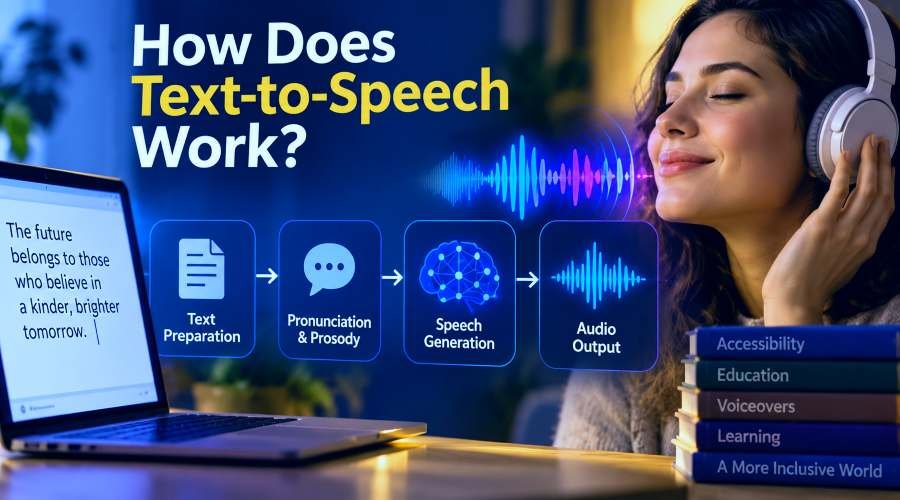
Text-to-speech, usually shortened to TTS, turns written text into spoken audio. A TTS system analyzes the text, works out things such as pronunciation, sentence structure, pauses, and delivery, then synthesizes an audio signal that can be played back. Older TTS systems often relied on prerecorded speech elements or earlier synthesis methods. Many modern systems use neural networks to produce more natural voices. TTS is used for accessibility, reading assistance, education, navigation, voiceovers, apps, presentations, videos, and other situations where listening is more useful than reading.
What Does TTS Mean?
TTS simply means text-to-speech.
Written text → Text-to-speech system → Spoken audio
NVIDIA describes text-to-speech as a form of speech synthesis that converts text characters into spoken output. IBM similarly describes TTS as technology that converts text on a digital interface into audio. Sources: NVIDIA and IBM.
The term speech synthesis is closely related. Speech synthesis refers more broadly to the artificial production of spoken speech, while text-to-speech describes the common situation where written text is the input.
For example, imagine you type:
“Your order will arrive tomorrow morning.”
A TTS system can process those written words and generate an audio version of the same sentence. Depending on the software, that speech may be played immediately or downloaded as an audio file.
That sounds simple from the user's side. Behind the scenes, however, the system has several decisions to make before the text can sound like natural speech.
A Simple Example of Text Becoming Speech
Consider this sentence:
“Your meeting is at 3:30 p.m. on September 19.”
A person immediately understands how most of that sentence should sound. A speech-synthesis system has to turn the written representation into something suitable for spoken delivery.
The system may need to interpret “3:30” as a time rather than reading each character separately. It needs to understand the abbreviation “p.m.” and decide where the sentence naturally pauses. It also needs pronunciation, timing, stress, and intonation information before producing the final speech.
NVIDIA describes text analysis in TTS as including tasks such as separating text into words and sentences, expanding abbreviations, and interpreting expressions such as dates and monetary amounts. Linguistic processing can then refine pronunciation, word duration, grammar, and prosody. NVIDIA
Prosody is the rhythm and delivery of speech. It includes qualities such as stress, timing, pauses, pitch, and intonation. The W3C Speech Synthesis Markup Language specification also identifies pronunciation, volume, pitch, speaking rate, and related properties as controllable aspects of synthesized speech. W3C SSML
This is why text-to-speech is more complicated than attaching an audio recording to every word in a dictionary. Written language contains abbreviations, punctuation, numbers, names, context, and phrases that can change how something should be spoken.
How Does Text-to-Speech Work?
The exact architecture varies between systems, especially when comparing older speech engines with modern neural TTS. For a beginner, though, the process is easier to understand as two main jobs: work out how the text should be spoken, then generate the speech audio.
The system prepares the text
The first stage deals with the written input.
A TTS system can analyze words, punctuation, sentence structure, abbreviations, numbers, dates, and other expressions. It then needs to determine how words should be pronounced and how the sentence should flow.
IBM describes modern TTS as involving linguistic analysis before speech synthesis. NVIDIA describes a similar process in which text analysis feeds into linguistic analysis that refines pronunciation, word duration, grammatical information, and prosodic structure. Sources: IBM and NVIDIA.
Imagine the text contains:
“Dr. Smith has 12 appointments at 2:00.”
A system should not normally pronounce “Dr.” as the letters D and R or treat “2:00” as unrelated digits. Preparing written language for speech helps turn that kind of input into something listeners can understand naturally.
The system generates audio
Once the system has an appropriate representation of what should be spoken, it must produce an actual audio signal.
Modern neural systems can predict acoustic information representing how the speech should sound. A component commonly called a vocoder can then turn that acoustic representation into an audio waveform that a device can play. NVIDIA and IBM both describe this broad synthesis process, although implementations differ between models and providers. Sources: NVIDIA and IBM.
You do not need to understand spectrograms, vocoders, or neural-network architecture to use TTS. The important mental model is simpler:
The system interprets the text, decides how it should be spoken, and generates the corresponding audio.
Is Text-to-Speech AI?
Text-to-speech can use AI, but TTS and AI are not the same thing.
TTS describes the job being performed: converting written text into spoken speech. AI or neural TTS describes technologies that can be used to perform that job.
Text-to-speech technology existed before today's neural voice models. NVIDIA notes that earlier systems commonly worked with prerecorded speech elements assembled into output, while newer approaches increasingly use neural networks to generate speech. NVIDIA
This distinction matters because phrases such as AI voice, neural TTS, and text-to-speech are often used together online even though they do not mean exactly the same thing.
When someone says “AI text-to-speech,” they are generally talking about a TTS system that uses modern machine-learning or neural techniques to generate the voice. When someone says simply “TTS,” the term describes the broader text-to-speech function, regardless of the particular synthesis method behind it.
What Is Text-to-Speech Used For?
TTS is useful whenever written information needs to become audible. That makes the technology relevant to far more than one type of user.
Accessibility and reading support
Text-to-speech has long played an important role in accessibility. Written information can be spoken aloud for people who have difficulty reading text visually or who benefit from hearing information rather than relying only on the screen.
IBM and NVIDIA both identify accessibility and reading assistance as important applications of TTS technology. Sources: IBM and NVIDIA.
TTS is not identical to a screen reader, however. A full screen reader can include navigation and accessibility features for interacting with an interface, while text-to-speech is the speech-generation technology that may be used as part of a wider accessibility system.
Learning and listening
Students and other readers can use TTS to listen to notes, articles, drafts, lessons, and other written material.
Listening can also be useful when looking at a screen is inconvenient. A person might want to hear a document while doing another task or listen back to something they have written to notice awkward phrasing that was easy to miss while reading.
Videos and voiceovers
Creators can turn a written script into narration without recording every sentence themselves.
This can be useful for tutorials, product demonstrations, educational videos, social content, draft voiceovers, presentations, and other script-based formats. When a line changes, the creator can edit the underlying text and generate the updated section again rather than necessarily recording the entire script from scratch.
Apps and digital experiences
TTS can provide spoken output inside software and devices.
Navigation instructions are an obvious example. Virtual assistants, alerts, interactive applications, educational software, and customer-facing systems can also generate speech from information that changes dynamically rather than relying only on a library of prerecorded sentences.
Turning written content into reusable audio
Dedicated TTS tools can also create downloadable audio from text. This makes the technology useful when the final goal is not simply to hear something once but to use the generated speech in another project.
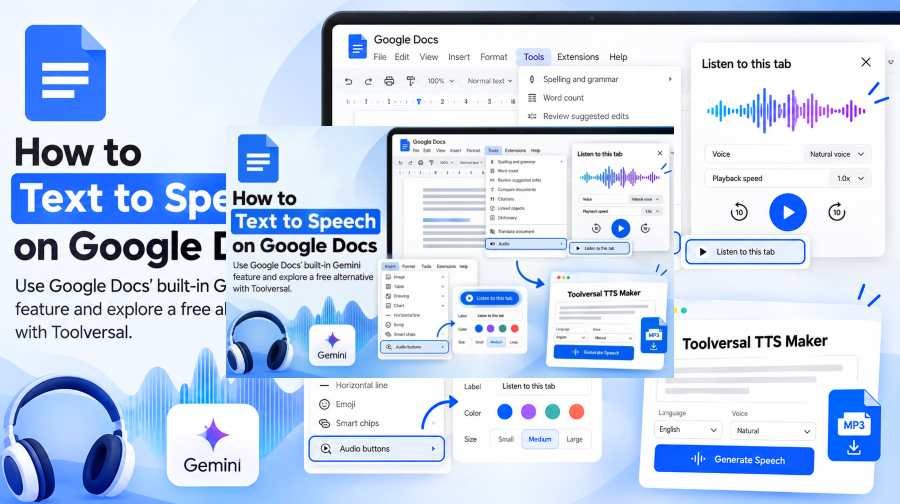
For example, Toolversal lets users enter text, choose a voice, adjust supported voice settings, generate speech, and download the resulting audio.
What Can You Control in a TTS Voice?
The amount of control depends on the TTS engine or application. A simple read-aloud feature may give you only a few options, while a dedicated speech-generation tool can expose more settings.
- Voice: Changes the synthetic speaker used for the output.
- Language or accent: Available options depend on the speech system and voice library.
- Speed: Changes how quickly the speech is delivered.
- Pitch: Adjusts how high or low the voice sounds.
- Volume: Controls output loudness when supported.
- Pauses: Can change the timing between words, phrases, or sections.
- Pronunciation and prosody: More advanced systems may provide ways to influence how words are pronounced or how the speech is delivered.
The W3C SSML specification provides standardized markup for controlling several speech properties, including pronunciation, pitch, volume, and rate, although support and implementation vary between synthesis platforms. W3C SSML
Toolversal's current TTS interfaces expose options including voice selection, speed, and pitch, while its main TTS Maker also presents additional delivery controls.
Changing these settings does not change the meaning of your text, but it can significantly change how the resulting speech feels to a listener.
Text-to-Speech vs Speech-to-Text
Text-to-speech and speech-to-text sound similar, but they work in opposite directions.
Text-to-speech: written text → spoken audio
Speech-to-text: spoken audio → written text
Mozilla's MDN documentation makes the distinction clearly. The Web Speech API includes SpeechSynthesis for text-to-speech and SpeechRecognition for recognizing spoken audio. MDN Web Speech API
Imagine you have a written video script and want narration. That is a text-to-speech task.
If you already have a recorded interview and want a written transcript, that is a speech-to-text task.
Some applications combine both technologies, especially conversational systems, but they remain different processes.
Is TTS the Same as an AI Voice Generator?
There is significant overlap, but the terms are not perfectly interchangeable.
Text-to-speech describes a specific function: converting text into spoken audio.
“AI voice generator” is a broader and less standardized term. It is often used for neural text-to-speech products, but it can also describe other forms of computer-generated voice technology.
For a beginner, the easiest rule is to look at the input and output. If you enter written words and the system speaks those words, text-to-speech is taking place.
That does not tell you exactly which AI model, speech engine, or synthesis method the product uses. Those are implementation details behind the function.
What TTS Can and Cannot Do
Modern TTS can make spoken content much easier to generate, but the quality of the result is not determined by the words alone.
Names, abbreviations, numbers, specialized terminology, ambiguous words, punctuation, language, and sentence structure can all affect how speech should be pronounced or paced. Speech-synthesis standards even include mechanisms for overriding pronunciation because automated pronunciation cannot resolve every possible case perfectly. W3C SSML
The quality and capabilities also vary between systems. One TTS tool may provide many voices and detailed delivery controls, while another may simply read text aloud using the speech synthesizer available on the user's device. MDN, for example, documents browser speech synthesis that can use voices available through the device's speech system. MDN
TTS also does not inherently translate text. Converting an English sentence into spoken English and translating that English sentence into another language are different operations, even though a product may combine both capabilities.
Most importantly, generated speech still needs to be checked when pronunciation, names, technical terminology, emotional delivery, or production quality matter. The fact that a system can speak a sentence does not guarantee that its first interpretation will always be the one you intended.
Try Text-to-Speech Yourself
Reading about speech synthesis makes more sense once you hear the process yourself.
You can use Toolversal's free text-to-speech generator and try a simple sentence such as:
“Today I'm testing text-to-speech to hear how the voice sounds when I change the speaking speed.”
A simple experiment is enough:
- Paste the sentence into the text box and choose a voice.
- Generate it using the default settings and listen to the result.
- Change one setting, such as speed or pitch, then generate the same text again.
- Changing only one variable makes it easier to understand what that control actually affects. You can then experiment with punctuation, numbers, longer sentences, names, or a short script.
That is the basic TTS workflow in practice: write the text, choose how you want it spoken, generate the audio, listen, and adjust if necessary.
Frequently Asked Questions About TTS
What does TTS stand for?
TTS stands for text-to-speech. It refers to technology that converts written text into synthesized spoken audio.
Is text-to-speech artificial intelligence?
Some TTS systems use artificial intelligence and neural networks, especially modern systems designed to generate more natural speech. However, TTS is the broader function of converting text into speech, and text-to-speech technology existed before today's neural AI systems.
Can TTS read any text?
A TTS system can process many types of written text, but supported languages, input length, voices, pronunciation behavior, file formats, and other limitations depend on the product. Unusual names, acronyms, technical terms, or ambiguous wording can also require additional attention.
Can text-to-speech create downloadable audio?
Some TTS systems primarily read text aloud, while others allow the generated speech to be saved or downloaded. Toolversal's TTS Maker and free TTS interface currently support downloadable generated audio.
Is text-to-speech the same as speech-to-text?
No. Text-to-speech converts written text into audio. Speech-to-text works in the opposite direction by converting spoken audio into written text.
Does TTS translate text into another language?
Not automatically. Text-to-speech and translation are separate functions. A product can combine translation with speech synthesis, but converting text to audio by itself does not mean the content has been translated.
From Written Words to Spoken Audio
The easiest way to understand TTS is to remember the direction of the process: text goes in and speech comes out.
What happens in between can range from a relatively simple synthesis system to sophisticated neural models that analyze language and generate highly controlled speech. For the user, however, the purpose remains straightforward: turn something written into something that can be heard.
That makes text-to-speech useful for accessibility, listening, education, apps, voiceovers, videos, presentations, and many other tasks where audio is more useful than text alone.
Once the concept is clear, the most useful next step is to hear it in practice. Open the Toolversal TTS Maker, enter a short piece of text, choose a voice, and listen to how the written words become speech.