Text-to-speech works by taking written text, interpreting how that text should be pronounced and delivered, and then generating an audio signal that sounds like spoken language. What looks like a simple “Generate Speech” button can involve several different stages working together behind the scenes.
A TTS system may need to recognize sentence boundaries, understand abbreviations, interpret numbers and dates, determine pronunciation, predict pauses and emphasis, model the characteristics of a selected voice, and finally turn all of that information into audio that a phone, browser, app, or media player can play.
If you are completely new to the technology, our guide to what TTS is explains the broader concept, common uses, and related terminology. This article goes deeper into one specific question: how does text-to-speech actually turn written words into spoken audio?
TL;DR: How Text-to-Speech Works
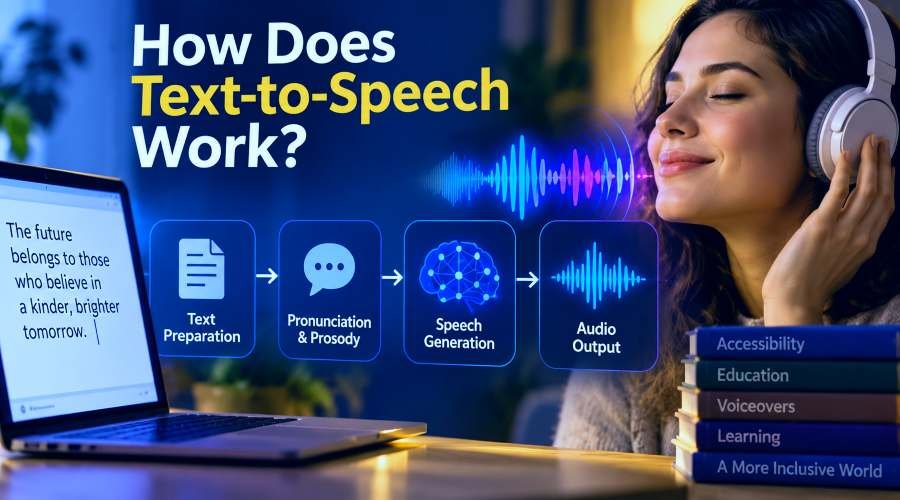
Most modern text-to-speech systems follow the same broad journey even though the technology inside individual engines can differ. Written text first needs to be prepared for speech. The system may interpret punctuation, expand abbreviations, understand numbers, determine pronunciation, and estimate how the sentence should flow. Modern neural TTS systems then use speech-generation models to turn that linguistic information into an acoustic representation and, ultimately, a playable audio waveform.
Written text → text preparation → pronunciation and prosody → speech generation → audio
Older TTS systems often relied on recorded speech pieces or other synthesis techniques. Modern neural systems use machine-learning models to generate speech more flexibly, but the fundamental goal remains the same: transform written language into understandable spoken audio.
Start With a Sentence a TTS System Has to Interpret
Consider this sentence:
“Dr. Lee paid $12.50 at 3:30 p.m.”
A person can read it without thinking much about the individual symbols. A computer initially receives characters, punctuation, numbers, and abbreviations. Before the system can generate useful speech, it has to work out what those written elements are supposed to mean when spoken aloud.
For example, “Dr.” probably means “Doctor” in this context. $12.50 needs to become something like “twelve dollars and fifty cents,” while 3:30 p.m. needs to be recognized as a time rather than a random collection of numbers, punctuation, and letters.
The system also needs to decide where the sentence should pause and how the voice should move through it. Even this short example shows why text-to-speech involves far more than attaching a prerecorded sound to every written word. The entire TTS pipeline can be easier to understand by following the text from its original written form to the final audio.
1. The System Receives the Written Text
Every TTS process begins with text input. That input might be a single sentence, a long article, a video script, a navigation instruction, a chatbot response, or text generated dynamically by an application.
For someone using a web-based TTS tool, the process usually begins by typing or pasting text into an input field. In software, the same text might be sent automatically through an API without the user ever seeing the technical request.
At this stage, the system knows what characters were submitted, but those characters still need to be converted into something suitable for spoken language. This is where text preparation becomes important.
2. Text Normalization Makes Written Language Speakable
Written language contains many forms that humans understand visually but would never pronounce literally. Take the number:
$25
Most English speakers would naturally say “twenty-five dollars,” not “dollar sign two five.” The same applies to a time such as 7:45, a date such as Jan. 12, a percentage such as 18%, or a measurement such as 10 km. A TTS system often needs to turn these written forms into a representation that makes sense when spoken.
This process is commonly called text normalization. Normalization may involve dates, times, currency, abbreviations, measurements, symbols, phone numbers, URLs, percentages, acronyms, and other forms of written shorthand. The correct interpretation can also change depending on context.
For example, the digits 2026 may naturally be spoken as “twenty twenty-six” when referring to a year. In another context, the same digits may need to be pronounced differently.
This stage is important because natural-sounding audio cannot fix incorrectly interpreted text. A voice may sound smooth and realistic while still saying the wrong thing if the original characters were misunderstood.
3. The Text Is Divided Into Meaningful Linguistic Units
After basic normalization, the system needs to identify the structure of the language. That can involve separating sentences, recognizing individual words, interpreting punctuation, and identifying grammatical relationships that may affect pronunciation or delivery.
Punctuation matters more than it may seem. Compare these two sentences:
“Let's eat, Sarah.”
“Let's eat Sarah.”
The words are nearly identical, but the comma changes both the meaning and the way the sentence should be spoken. A TTS system therefore needs to treat punctuation as information rather than decoration.
Question marks, commas, full stops, exclamation marks, brackets, quotation marks, and other punctuation can influence pauses, sentence boundaries, rhythm, and intonation.
Modern systems can use surrounding context to make better decisions about how a sentence should sound, but that does not mean a TTS model understands language in exactly the same way a person does. Its job is to extract enough linguistic information to produce appropriate speech.
4. The System Works Out How Each Word Should Be Pronounced
Once the text has been organized, the TTS engine needs pronunciation information. A written word and a spoken word are not the same thing, so the system needs a way to map spelling to sound. In speech technology, you may see this described as grapheme-to-phoneme conversion.
A grapheme relates to written characters, while a phoneme is a meaningful unit of sound. In practical terms, the system is working out how the letters on the screen should sound when spoken.
English makes this surprisingly difficult because identical spellings can have different pronunciations depending on context. Consider:
“I read books every evening.”
“I read that book yesterday.”
The word is written exactly the same way, yet it is pronounced differently. Names, brand names, technical terminology, foreign words, acronyms, and newly invented terms introduce even more uncertainty. A TTS engine may use pronunciation dictionaries, linguistic rules, context, and learned patterns to decide what is most likely to be correct.
Why Can a Natural TTS Voice Still Mispronounce a Name?
Voice quality and pronunciation accuracy are related, but they are not the same problem. A speech model may generate a very natural-sounding voice while still selecting the wrong pronunciation for an unfamiliar name. A person's name may also have several legitimate pronunciations depending on language, region, family preference, or personal choice.
The written spelling alone may not always contain enough information to determine the intended version. This is why names, acronyms, product names, and technical terminology should still be reviewed when accurate pronunciation matters. Some TTS systems also provide pronunciation controls or support markup that allows developers to influence how specific words should be spoken.
5. The TTS System Predicts Prosody
Pronouncing every word correctly is not enough to make speech sound natural. A sentence also needs rhythm, pauses, pitch changes, stress, and timing. These characteristics are commonly grouped under the term prosody.
Imagine listening to an entire paragraph where every word has exactly the same pitch, speed, pause length, and emphasis. The pronunciation could technically be correct, but the result would still sound mechanical.
Natural speech changes constantly. A question may rise or shift in pitch differently from a statement. A comma may create a short pause, while the end of a sentence may need a longer one. Certain words may need stronger emphasis, while others should pass quickly as part of the sentence rhythm.
Modern neural TTS systems try to predict these patterns from the text, its punctuation, surrounding words, and patterns learned during training. This is one reason two TTS voices can pronounce the same sentence correctly and still sound very different. Their timing, emphasis, rhythm, and intonation may not be the same.
6. The Voice Model Creates a Representation of the Speech
Once the system has determined what should be said and how it should be delivered, the next challenge is generating the actual sound. Many neural TTS systems first produce an intermediate acoustic representation rather than immediately creating the finished audio file. One commonly discussed example is a mel spectrogram.
A spectrogram represents how the frequency content of a sound changes over time. You can think of it as a detailed acoustic blueprint showing what the speech should sound like before it becomes the final audio waveform.
The speech model can predict this acoustic information from the processed text, pronunciation, timing, voice characteristics, and other conditioning information.
Not every modern TTS system uses exactly the same architecture. Some newer models combine stages that older systems kept separate, while others generate audio in different ways. The important concept is that the system needs some method of transforming linguistic information into an acoustic representation of speech.
7. The System Produces the Final Audio Waveform
Eventually, all of that language and acoustic information has to become real audio. Speakers and headphones cannot play phonemes, linguistic features, or spectrogram data directly. They need an audio waveform.
In many neural TTS architectures, a component known as a vocoder converts the predicted acoustic representation into that waveform. The waveform represents changes in the audio signal over time and can finally be played through a device.
This is one of the last major stages of the synthesis pipeline. You can think of the relationship like this:
Text describes what should be said.
The linguistic model determines how it should be spoken.
The speech-generation system determines what that speech should sound like.
The final waveform becomes the sound that reaches your ears.
Some newer architectures blur the boundaries between these stages, so the exact sequence is not universal. However, this model remains a useful way to understand how many modern TTS systems work.
8. The Audio Is Prepared for Playback or Download
Once the waveform exists, the system still needs to deliver it to the user. In some applications, speech begins playing almost immediately. This is common in navigation, accessibility tools, assistants, and conversational applications where the listener expects a quick response.
Other systems generate an audio file that can be downloaded and reused later. The output might be encoded as MP3, WAV, PCM, or another supported audio format depending on the service.
From the user's perspective, all of these technical stages may happen behind one button. You type a sentence, click “Generate,” and hear a voice. Behind that simple interaction, the system may already have processed numbers and abbreviations, chosen pronunciations, predicted timing, generated acoustic speech information, created a waveform, and encoded the result for playback.
How Neural TTS Changed Text-to-Speech
Text-to-speech did not begin with modern artificial intelligence. Earlier systems often used concatenative synthesis, where recorded pieces of human speech were stored and combined to create new sentences. A system could select appropriate fragments and join them together to form the requested output.
This approach could produce understandable speech, but flexibility and natural transitions were challenging. Other systems used mathematical or statistical models to generate speech rather than assembling recorded fragments.
Neural TTS changed the field by allowing machine-learning models to learn relationships between text, pronunciation, speaker characteristics, prosody, and acoustic patterns from large amounts of training data.
Instead of selecting only from prerecorded pieces, neural systems can generate speech characteristics dynamically. This gives them more flexibility over how words, sentences, and voices are produced. It is still important to separate two ideas: TTS describes the function of converting text into speech, while neural TTS describes one modern method of doing it.
Where Does the TTS Voice Come From?
When you choose a voice inside a TTS tool, you are usually choosing more than a simple audio effect. The selected voice can influence the synthesis process itself. Depending on the system, different speaker models, learned speaker representations, conditioning information, or other techniques may be used to generate different vocal identities.
That is why changing the selected voice may alter more than pitch. Voices can differ in accent, pacing, tone, energy, timbre, pronunciation tendencies, and expressive style.
Some TTS systems also expose controls for speed, pitch, pauses, volume, or speaking style. These settings can influence the way speech is synthesized, although the exact method varies between engines.
Does a TTS System Understand What It Is Saying?
Not necessarily in the same way a person does. Modern systems can use context and sophisticated language representations to make better decisions about pronunciation and delivery. This can make the voice sound as though it understands the sentence deeply.
However, fluent speech should not automatically be treated as proof of human-like understanding. Consider:
“I saw the bass.”
The word “bass” could refer to a fish or a low musical sound, and the pronunciation changes depending on the meaning. A longer sentence may provide enough context for the model to choose correctly, while a short ambiguous sentence might not.
This demonstrates another important rule of TTS: clearer input gives the system a better chance of producing the intended output.
Why Punctuation Can Change TTS Output
Punctuation directly influences how written language should be spoken. Compare:
“Wait John.”
“Wait, John.”
“Wait, John!”
A person would probably deliver these sentences differently. A TTS system can also use punctuation when estimating pauses, sentence structure, emphasis, and intonation.
This is why text written specifically for speech can sometimes perform better than a long block copied directly from a formal document. If you are preparing a script for TTS, clear punctuation, sensible sentence lengths, understandable abbreviations, and unambiguous wording can make the synthesis process easier.
You are not simply writing something that looks correct on a page. You are writing something that also needs to sound natural when heard.
Why Two TTS Tools Can Sound Different
Two text-to-speech systems can receive exactly the same sentence and still produce noticeably different audio. The difference can come from many parts of the pipeline, including text normalization, pronunciation handling, model architecture, training data, prosody prediction, voice design, vocoders, language support, and synthesis settings.
Even something as simple as the way a system interprets punctuation or an abbreviation can affect the final result. This is why counting how many voices a TTS platform offers does not tell you everything about speech quality. The technology processing the text matters just as much as the number of voices available.
Can Text-to-Speech Work in Real Time?
Yes. Some modern TTS systems can generate speech quickly enough for interactive applications. Real-time synthesis is useful for conversational assistants, navigation, games, live accessibility features, customer-support systems, and other applications where a long delay would interrupt the experience.
Long-form speech generation can follow a different workflow. An audiobook chapter, long lecture, or large document may be generated asynchronously because the entire output does not need to appear instantly.
The speed of TTS therefore depends on several factors, including the model, text length, infrastructure, requested audio quality, and whether the application prioritizes low latency or longer-form generation.
See the TTS Process in Practice
You do not need to build a neural speech model to understand the practical side of the process.
Open the Toolversal TTS Maker and try a sentence that includes different kinds of written information:
“My appointment is at 4:30 p.m. on October 12, and the total is $29.95.”
Generate the sentence once using a voice you like. Then keep the text the same and change only one setting, such as speaking speed or pitch.
Listening to one controlled change at a time makes it easier to understand how the settings influence the final audio. You can then experiment with punctuation, names, numbers, longer sentences, or a complete script.
The technical pipeline remains hidden behind the interface, which is exactly what a good TTS tool should do. You provide the text and the desired settings, while the underlying speech system handles the complicated conversion.
What Really Happens After You Click “Generate”?
The full process sounds complicated when each technical stage is examined individually, but the overall idea is straightforward. First, the system turns raw written text into something that makes sense as speech. It interprets words, punctuation, numbers, abbreviations, pronunciation, sentence structure, timing, and delivery.
Next, the speech-generation system creates the acoustic characteristics of the voice and ultimately produces an audio waveform that can be played or downloaded.
Different TTS engines may handle these stages in different ways, and newer architectures continue to change how speech is generated. The central transformation, however, stays the same:
Written language → linguistic interpretation → synthesized speech
If you want the broader beginner explanation, including what TTS means, where it is used, how it differs from speech-to-text, and how AI fits into the technology, read our complete guide to what TTS is.
Once you understand the pipeline, the easiest next step is to hear it for yourself. Try your own sentence with the Toolversal TTS Maker and see how the same written text can change when you adjust the voice or delivery settings.