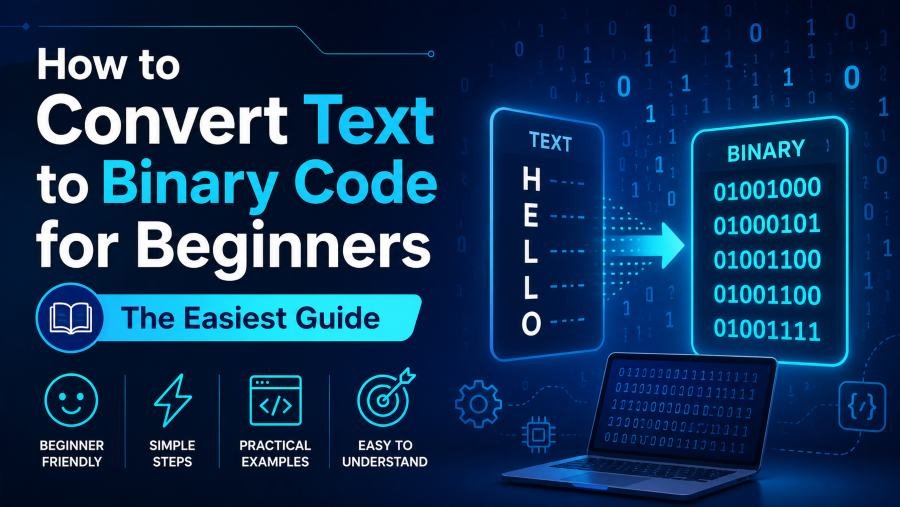
Learning how computers understand text can feel confusing at first. You type a letter like A, but a computer does not really store the shape of that letter. It stores data as numbers, and those numbers are represented using binary code.
That is why learning how to convert text to binary code for beginner use is one of the best first steps in understanding computer science, coding, data encoding, and digital communication.
Binary code is made only of 0s and 1s. These two digits represent the basic on-and-off states used by computers. Every letter, number, symbol, punctuation mark, and space can be represented in binary when it is passed through a character encoding system like ASCII or Unicode.
In this beginner guide, you will learn what binary code means, how text becomes binary, how ASCII works, how to convert words manually, and how to avoid the most common beginner mistakes.
By the end, you will be able to convert simple words like Hello, Cat, and Hi! into binary code with confidence.
What Is Binary Code?
Binary code is a number system that uses only two digits: 0 and 1.
Unlike the decimal system, which uses ten digits from 0 to 9, binary uses only two possible values. This makes it perfect for computers because electronic circuits work with two main states:
-
0 means off
-
1 means on
Every digital device uses binary at some level. Your phone, laptop, calculator, website, app, and even smart TV process information using binary data.
Text is no different.
When you type a letter, the computer does not store that letter as a visual symbol. Instead, it stores a number that represents the character. That number is then stored in binary form.
For example:
| Character | Decimal Value | Binary Code |
|---|---|---|
| A | 65 | 01000001 |
| B | 66 | 01000010 |
| C | 67 | 01000011 |
So when you type A, the computer can represent it as:
01000001
This is the basic idea behind text-to-binary conversion.
What Does It Mean to Convert Text to Binary?
To convert text to binary means changing each character in your text into a binary number.
A character can be:
-
A letter
-
A number
-
A space
-
A punctuation mark
-
A symbol
For example, the word Hi has two characters:
-
H
-
i
Each character has its own numeric value. That numeric value can be written in binary.
So:
H = 01001000
i = 01101001
That means:
Hi = 01001000 01101001
The space between the two binary groups is added for readability. It helps you see where one character ends and the next begins.
This is important because text is usually converted character by character, not word by word.
Why ASCII Matters for Beginners
ASCII stands for American Standard Code for Information Interchange.
It is one of the most common beginner-friendly systems for converting text into numbers. ASCII assigns a decimal number to English letters, digits, punctuation marks, and basic symbols.
Once you know the ASCII number of a character, you can convert that number into binary.
For example:
| Character | ASCII Decimal | Binary |
|---|---|---|
| H | 72 | 01001000 |
| e | 101 | 01100101 |
| l | 108 | 01101100 |
| o | 111 | 01101111 |
ASCII is useful for beginners because it keeps the process simple.
You can think of it like this:
Text character → ASCII number → Binary code
Example:
A → 65 → 01000001
That is the complete conversion path.
How to Convert Text to Binary Code for Beginner Step by Step
The easiest way to learn text-to-binary conversion is to start with a short word.
Let’s use the word:
Cat
This word has three characters:
-
C
-
a
-
t
You must convert each character separately.
Step 1: Split the Text Into Characters
First, break the word into individual characters.
| Word | Characters |
|---|---|
| Cat | C, a, t |
Do not convert the whole word as one item. Each character has its own ASCII value and its own binary code.
Step 2: Find the ASCII Decimal Value
Now find the ASCII number for each character.
| Character | ASCII Decimal |
|---|---|
| C | 67 |
| a | 97 |
| t | 116 |
Notice that uppercase and lowercase letters are different.
For example:
| Character | ASCII Decimal |
|---|---|
| A | 65 |
| a | 97 |
This means Cat and cat do not produce the same binary code.
Step 3: Convert Each Decimal Value Into Binary
Now convert each decimal number into binary.
| Character | Decimal | Binary |
|---|---|---|
| C | 67 | 01000011 |
| a | 97 | 01100001 |
| t | 116 | 01110100 |
So:
Cat = 01000011 01100001 01110100
That is the full manual process.
For a faster option, you can use this text to binary converter to convert words, numbers, spaces, and symbols into binary instantly.
Example: Convert “Hello” to Binary
Now let’s convert a more common word:
Hello
First, split it into characters:
-
H
-
e
-
l
-
l
-
o
Then find the ASCII value and binary code for each character.
| Character | ASCII Decimal | Binary |
|---|---|---|
| H | 72 | 01001000 |
| e | 101 | 01100101 |
| l | 108 | 01101100 |
| l | 108 | 01101100 |
| o | 111 | 01101111 |
So the binary code for Hello is:
01001000 01100101 01101100 01101100 01101111
Each 8-bit group represents one character.
This is why a five-letter word becomes five binary groups.
Why Is Binary Text Written in 8-Bit Groups?
A single binary digit is called a bit.
A group of 8 bits is called a byte.
In many beginner ASCII examples, one character is represented using one byte. That is why text-to-binary output is commonly shown in 8-bit groups.
Example:
A = 01000001
This binary code has 8 bits:
0 1 0 0 0 0 0 1
That is one byte.
When you convert a word, every character usually becomes one 8-bit byte.
Example:
| Text | Binary |
|---|---|
| O | 01001111 |
| K | 01001011 |
So:
OK = 01001111 01001011
The 8-bit format makes binary easier to read, copy, check, and convert back into text.
What Happens to Spaces in Binary?
A space is also a character.
This is one of the biggest beginner mistakes. Many people think a space means nothing, but computers treat it as real data.
In ASCII, a space has the decimal value 32.
The 8-bit binary code for a space is:
00100000
So the phrase:
Hi Bob
has six characters:
-
H
-
i
-
space
-
B
-
o
-
b
The binary becomes:
01001000 01101001 00100000 01000010 01101111 01100010
If you remove the space, the phrase becomes:
HiBob
That is different text.
So whenever you convert a sentence into binary, you must include spaces.
What Happens to Numbers in Binary Text?
Numbers can be confusing because a number typed as text is treated as a character.
For example, the character 5 is not the same as the mathematical value five inside a calculation.
In ASCII:
| Character | ASCII Decimal | Binary |
|---|---|---|
| 5 | 53 | 00110101 |
So if you convert:
A5
You get:
01000001 00110101
The first byte is for A.
The second byte is for 5.
This matters because computers can treat numbers differently depending on context.
A number in a math operation is processed differently from a number stored inside a text string.
What Happens to Punctuation and Symbols?
Punctuation marks also have binary values.
If you type a period, comma, question mark, or exclamation mark, it must be converted too.
Examples:
| Symbol | ASCII Decimal | Binary |
|---|---|---|
| ! | 33 | 00100001 |
| ? | 63 | 00111111 |
| . | 46 | 00101110 |
| , | 44 | 00101100 |
So the text:
Hi!
has three characters:
-
H
-
i
-
!
Its binary code is:
01001000 01101001 00100001
The exclamation mark is part of the text, so it gets its own binary group.
ASCII vs Unicode: What Beginners Should Know
ASCII is great for basic English text.
It can handle:
-
Uppercase English letters
-
Lowercase English letters
-
Digits
-
Common punctuation
-
Basic symbols
-
Spaces
But ASCII is limited.
Modern text includes many characters that ASCII cannot fully represent, such as:
-
Emojis
-
Bengali letters
-
Arabic letters
-
Chinese characters
-
Accented letters
-
Special currency symbols
That is where Unicode comes in.
Unicode is a larger character standard that supports characters from many writing systems. UTF-8 is one of the most common ways to encode Unicode characters on the web.
For beginners, remember this rule:
Use ASCII when learning simple English text conversion.
Use Unicode or UTF-8 when working with emojis, special symbols, or non-English text.
This is why different online converters may produce different binary results for the same emoji or special character.
They may be using different encoding systems.
How to Convert Binary Back to Text
Binary-to-text conversion is the reverse process.
To convert binary back to text:
-
Split the binary into 8-bit groups.
-
Convert each binary group into decimal.
-
Match each decimal value to its ASCII character.
-
Combine the characters in order.
Example:
01001000 01101001
Split into two groups:
| Binary | Decimal | Character |
|---|---|---|
| 01001000 | 72 | H |
| 01101001 | 105 | i |
So:
01001000 01101001 = Hi
The most important part is grouping.
If you split the binary in the wrong place, the output will be wrong.
This is why binary text is usually shown with spaces between every 8 bits.
Manual Decimal to Binary Example
Let’s manually convert decimal 65 into binary.
Decimal 65 is the ASCII value for uppercase A.
Binary uses powers of 2.
| Binary Place | Decimal Value |
|---|---|
| 2⁷ | 128 |
| 2⁶ | 64 |
| 2⁵ | 32 |
| 2⁴ | 16 |
| 2³ | 8 |
| 2² | 4 |
| 2¹ | 2 |
| 2⁰ | 1 |
To make 65, you need:
64 + 1 = 65
Now mark the positions:
| 128 | 64 | 32 | 16 | 8 | 4 | 2 | 1 |
|---|---|---|---|---|---|---|---|
| 0 | 1 | 0 | 0 | 0 | 0 | 0 | 1 |
That gives:
01000001
So:
A = 01000001
This method works for any ASCII decimal value between 0 and 127.
Common Beginner Mistakes
Mistake 1: Converting a Whole Word as One Character
A word is not one binary unit.
Each character must be converted separately.
Wrong idea:
Cat = one binary code
Correct idea:
C + a + t = three binary bytes
That is why Cat becomes three 8-bit groups.
Mistake 2: Ignoring Capital Letters
Uppercase and lowercase letters have different ASCII values.
| Character | Binary |
|---|---|
| A | 01000001 |
| a | 01100001 |
So Apple and apple produce different binary output.
Mistake 3: Forgetting Spaces
A space has its own binary code:
00100000
If you convert a sentence, include every space.
Mistake 4: Ignoring Punctuation
Punctuation marks also count as characters.
For example:
! = 00100001
So Hi and Hi! do not have the same binary output.
Mistake 5: Mixing ASCII and Unicode
ASCII is not enough for every character.
If your text includes emojis or non-English letters, use Unicode or UTF-8.
Mistake 6: Removing 8-Bit Grouping
This binary is easy to read:
01001000 01101001
This version is harder:
0100100001101001
Both may represent the same text, but grouped binary is much easier for beginners.
Practice Examples for Beginners
Here are some simple text-to-binary examples.
| Text | Binary |
|---|---|
| A | 01000001 |
| B | 01000010 |
| a | 01100001 |
| b | 01100010 |
| Hi | 01001000 01101001 |
| Cat | 01000011 01100001 01110100 |
| Dog | 01000100 01101111 01100111 |
| Yes | 01011001 01100101 01110011 |
| No | 01001110 01101111 |
| OK | 01001111 01001011 |
Try converting your own name.
Write each letter separately, check the ASCII decimal value, and convert each one into binary.
If your name has a space, include the binary value for the space.
Why Learning Text to Binary Is Useful
Learning text-to-binary conversion is not only a classroom exercise.
It helps you understand how computers store and move information.
This is useful for:
-
Beginner programming
-
Computer science basics
-
Cybersecurity learning
-
Data encoding
-
Web development
-
Networking concepts
-
Digital communication
-
File storage understanding
When you understand text-to-binary conversion, other topics become easier.
For example, you will better understand:
-
Why encoding errors happen
-
Why special characters break in websites
-
Why emojis take more data than letters
-
Why uppercase and lowercase letters are different
-
Why data needs standards like ASCII and Unicode
You do not need to memorize every binary value.
The goal is to understand the process.
Simple Framework: Text → Code → Binary
The easiest way to remember the process is this:
Text → Character Code → Binary
Example:
A → ASCII 65 → 01000001
This framework helps you avoid confusion.
Binary is not magic. It is just a different way to write a number.
The character encoding system decides which number belongs to each character.
Then binary represents that number using 0s and 1s.
Final Thoughts
Learning how to convert text to binary code for beginner use becomes simple when you follow the right order.
Start with one character.
Find its ASCII value.
Convert that value into 8-bit binary.
Repeat the process for every character.
Remember these key rules:
-
Text is converted one character at a time.
-
Uppercase and lowercase letters are different.
-
Spaces count as characters.
-
Punctuation counts as characters.
-
ASCII is best for beginner English examples.
-
Unicode and UTF-8 are needed for modern global text.
Once you understand these rules, binary code becomes much easier to read and use.
Text-to-binary conversion is one of the simplest ways to see how human language becomes computer data. It gives you a clear foundation for learning programming, encoding, cybersecurity, and computer systems.
FAQs About Text to Binary Conversion
What is text to binary conversion?
Text to binary conversion is the process of changing letters, numbers, spaces, and symbols into binary code using a character encoding system such as ASCII or Unicode.
How do I convert text to binary manually?
Split the text into characters, find the ASCII decimal value of each character, and convert each decimal value into 8-bit binary.
What is the binary code for A?
The uppercase letter A has the ASCII decimal value 65. Its 8-bit binary code is 01000001.
Why are binary letters usually 8 bits?
Binary letters are often shown as 8-bit groups because 8 bits make one byte. In beginner ASCII examples, one character is commonly represented by one byte.
Does a space have binary code?
Yes. A space is a character. In ASCII, a space has the decimal value 32, which is 00100000 in binary.
Can I convert binary back to text?
Yes. Split the binary into 8-bit groups, convert each group into decimal, and match each decimal value with its ASCII character.
Is ASCII the same as binary?
No. ASCII is a character encoding system. Binary is a number system that uses only 0s and 1s.
Do emojis convert to binary?
Yes, but emojis usually require Unicode and UTF-8 encoding. They are not handled the same way as simple ASCII letters.
Why do uppercase and lowercase letters have different binary codes?
Uppercase and lowercase letters have different ASCII decimal values. For example, A is 65, while a is 97.
What is the easiest way to learn binary text conversion?
The easiest way is to practice with short English words, use an ASCII table, and convert each character into an 8-bit binary group.