Text formatting seems simple until you start working with blog posts, website content, emails, social media captions, academic documents, product descriptions, or programming documentation. A single paragraph written in the wrong text case can make content look unprofessional, difficult to read, or inconsistent with brand guidelines.
Whether you are a student, blogger, marketer, content creator, business owner, or developer, understanding different text cases can save hours of manual editing and help maintain consistency across your content.
In this guide, you'll learn what uppercase, lowercase, and title case are, when to use them, how to convert between them manually, common mistakes to avoid, and practical use cases for each format.
What Is Text Case?
Text case refers to the capitalization style used in written text.
Different text cases change how letters appear without changing the actual words.
For example, the sentence:
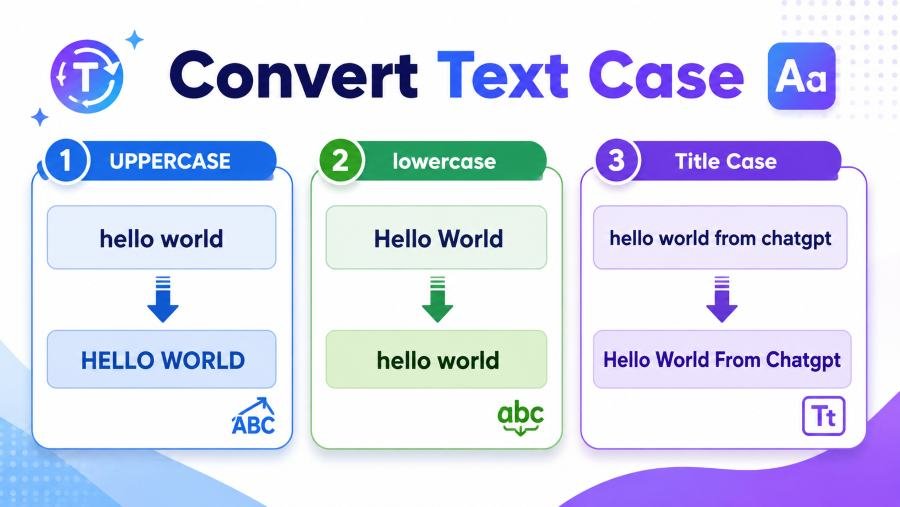
welcome to my website
can be transformed into multiple formats:
Lowercase
welcome to my website
Uppercase
WELCOME TO MY WEBSITE
Title Case
Welcome To My Website
The words remain the same, but their appearance changes.
Text case plays an important role in readability, branding, professionalism, and user experience.
Why Does Text Case Matter?
Many people think capitalization is just a grammar rule.
In reality, text case affects how readers perceive information.
For example:
| Text Style | Reader Perception |
|---|---|
| all lowercase | Casual, conversational |
| ALL UPPERCASE | Strong, loud, attention-grabbing |
| Title Case | Professional, polished |
| Mixed Random Case | Unprofessional, confusing |
Imagine a blog headline written like this:
how to start a business in 2026
Now compare it with:
How to Start a Business in 2026
The second version looks significantly more professional and easier to scan.
This is why publishers, journalists, bloggers, and marketers pay attention to capitalization.
What Is Uppercase?
Uppercase means converting all letters into capital letters.
Example:
Original Text
The quick brown fox jumps over the lazy dog.
Uppercase
THE QUICK BROWN FOX JUMPS OVER THE LAZY DOG.
Uppercase is commonly used for:
-
Warning messages
-
Headlines
-
Call-to-action buttons
-
Acronyms
-
Emphasis
-
Product labels
Benefits of Uppercase
Uppercase can:
-
Grab attention quickly
-
Create visual emphasis
-
Improve visibility on signs
-
Highlight important information
Examples:
-
BUY NOW
-
LIMITED OFFER
-
FREE SHIPPING
-
IMPORTANT NOTICE
When Uppercase Becomes a Problem
Many beginners overuse uppercase.
Writing entire paragraphs in uppercase can make content difficult to read.
Example:
THIS IS AN EXAMPLE OF A FULL PARAGRAPH WRITTEN IN UPPERCASE AND IT TAKES MORE EFFORT TO READ THAN NORMAL TEXT.
Most readers interpret excessive uppercase as shouting.
That is why professional writers use uppercase selectively.
What Is Lowercase?
Lowercase means converting every letter into small letters.
Example:
Original
Welcome To My Website
Lowercase
welcome to my website
Lowercase is the most common writing style for body content because it improves readability.
Most articles, books, emails, and reports use lowercase letters for the majority of their content.
Benefits of Lowercase
Lowercase:
-
Feels natural to readers
-
Improves reading speed
-
Looks cleaner in long paragraphs
-
Creates a conversational tone
Examples:
-
Blog content
-
Email messages
-
Product descriptions
-
Website copy
Many modern brands also use lowercase styling to appear friendly and approachable.
What Is Title Case?
Title case capitalizes the first letter of major words.
Example:
How to Convert Text Case
Each important word begins with a capital letter.
Title case is most commonly used for:
-
Blog titles
-
Article headlines
-
Book titles
-
Course names
-
Presentation slides
-
Landing page headings
Examples:
-
How to Start a Successful Blog
-
Best SEO Strategies for Beginners
-
The Ultimate Guide to Email Marketing
Title case creates a professional appearance while remaining easy to read.
Understanding the Difference Between Uppercase, Lowercase, and Title Case
Here is a simple comparison:
| Case Type | Example |
|---|---|
| Lowercase | how to convert text case |
| Uppercase | HOW TO CONVERT TEXT CASE |
| Title Case | How To Convert Text Case |
Each serves a different purpose.
Choosing the right one depends on where the text will be displayed.
How to Convert Text to Uppercase
Converting text to uppercase is straightforward.
Take:
Digital Marketing Strategies
Convert every letter to capital form:
DIGITAL MARKETING STRATEGIES
Manual Method
-
Select the text.
-
Replace every lowercase letter with its uppercase equivalent.
-
Leave numbers and punctuation unchanged.
Example:
| Original | Uppercase |
|---|---|
| hello | HELLO |
| website | WEBSITE |
| marketing | MARKETING |
Common Use Cases
Uppercase is useful for:
-
Call-to-action buttons
-
Warning messages
-
Navigation labels
-
Promotional banners
-
Product packaging
How to Convert Text to Lowercase
Lowercase conversion removes all capital letters.
Example:
HOW TO CONVERT TEXT CASE
becomes:
how to convert text case
Manual Method
-
Identify capital letters.
-
Replace them with lowercase versions.
-
Keep punctuation unchanged.
Example:
| Original | Lowercase |
|---|---|
| WEBSITE | website |
| BLOG | blog |
| CONTENT | content |
Lowercase is ideal for long-form reading experiences because it reduces visual strain.
How to Convert Text to Title Case
Title case is slightly more complex.
Instead of capitalizing every letter, you capitalize the first letter of significant words.
Example:
how to convert text case uppercase lowercase and title case
becomes:
How to Convert Text Case Uppercase Lowercase and Title Case
This format is commonly used for:
-
Blog titles
-
News headlines
-
Ebook titles
-
Landing pages
For quick formatting of headings, articles, social posts, emails, and documents, many writers use a dedicated text case converter to instantly switch between uppercase, lowercase, title case, sentence case, and other capitalization styles.
The Hidden Cost of Wrong Text Case
Most guides only explain what text case means.
Few discuss what happens when you use the wrong one.
SEO Impact
Search engines don't directly rank pages based on capitalization.
However, poorly formatted titles often reduce click-through rates.
Compare:
best seo tips for beginners
vs
Best SEO Tips for Beginners
The second headline appears more trustworthy and professional.
User Experience Impact
Poor capitalization can:
-
Reduce readability
-
Lower credibility
-
Increase bounce rates
-
Create visual clutter
Branding Impact
Large brands maintain capitalization standards.
Examples:
-
Apple
-
Google
-
Microsoft
-
Adobe
Consistency strengthens brand identity.
What I Learned After Editing Hundreds of Articles
One pattern appears repeatedly.
Most formatting mistakes happen after content is copied from:
-
PDFs
-
Word documents
-
AI tools
-
Emails
-
Social media platforms
Common issues include:
Entire Headings in Uppercase
Example:
HOW TO IMPROVE SEO PERFORMANCE
This may look aggressive in blog content.
Random Capitalization
Example:
How To improve SEO Performance
This creates inconsistency.
All Lowercase Headlines
Example:
how to improve seo performance
While readable, it often looks unfinished.
The best-performing content usually follows a clear capitalization standard throughout the page.
Best Practices for Using Uppercase
Use uppercase when:
✓ Creating buttons
✓ Displaying alerts
✓ Highlighting key actions
✓ Showing abbreviations
Examples:
-
DOWNLOAD NOW
-
REGISTER TODAY
-
FREE TRIAL
-
FAQ
Avoid using uppercase for:
✗ Entire blog posts
✗ Long paragraphs
✗ Product descriptions
✗ Email newsletters
Best Practices for Using Lowercase
Lowercase works best for:
-
Body text
-
Articles
-
Documentation
-
Emails
-
Knowledge bases
Lowercase improves readability because readers recognize word shapes faster.
This is why nearly every major publication uses lowercase for most written content.
Best Practices for Using Title Case
Title case is ideal for:
-
Headlines
-
Page titles
-
Course names
-
Ebook titles
-
Webinar names
Examples:
-
Complete Guide to Content Marketing
-
Beginner's Guide to SEO
-
Advanced Email Marketing Strategies
Title case balances professionalism and readability better than full uppercase.
Common Text Case Mistakes
Mistake 1: Using ALL CAPS Everywhere
ALL CAPS reduces readability.
Use it sparingly.
Mistake 2: Inconsistent Headlines
Example:
-
How to Start Blogging
-
best SEO Tips
-
CONTENT Marketing Guide
This inconsistency appears unprofessional.
Mistake 3: Capitalizing Every Word Incorrectly
Not every word always requires capitalization.
Many editorial styles exclude small connecting words depending on style guidelines.
Mistake 4: Ignoring Brand Standards
If your company style guide requires title case, don't switch randomly to uppercase.
Consistency matters.
Text Case in Different Industries
Blogging
Title case headlines perform best.
Ecommerce
Uppercase works well for:
-
SALE
-
LIMITED OFFER
-
FREE SHIPPING
Academic Writing
Sentence case is often preferred.
Social Media
Mixed usage works depending on platform and audience.
Corporate Communication
Professional title case is generally safest.
Quick Reference Table
| Purpose | Recommended Case |
|---|---|
| Blog Title | Title Case |
| Article Body | Lowercase |
| CTA Button | Uppercase |
| Product Label | Uppercase |
| Email Subject | Title Case |
| Documentation | Lowercase |
| Presentation Slide | Title Case |
Final Thoughts
Learning how to convert text case uppercase lowercase and title case is about more than changing letters.
The right capitalization improves readability, professionalism, user experience, and brand consistency.
Use uppercase when you need emphasis.
Use lowercase for comfortable reading.
Use title case for headlines and titles.
Most importantly, stay consistent throughout your content.
A well-formatted article often feels more trustworthy before a reader even begins reading the first paragraph.
That is the hidden power of proper text case formatting.
Frequently Asked Questions
What is uppercase text?
Uppercase text uses capital letters for every character, such as HELLO WORLD.
What is lowercase text?
Lowercase text uses small letters, such as hello world.
What is title case?
Title case capitalizes the first letter of major words, such as How to Convert Text Case.
Which text case is best for blog titles?
Title case is generally the most professional choice for blog titles and article headings.
Does text case affect SEO?
Text case does not directly impact rankings, but well-formatted titles can improve click-through rates and user experience.
Should I write entire paragraphs in uppercase?
No. Long uppercase paragraphs are harder to read and often feel like shouting.
What is the fastest way to change text case?
A text case converter can instantly transform text into uppercase, lowercase, title case, sentence case, and other formats.